This guide provides step-by-step instructions to migrate applications from using Application Insights SDKs (Classic API) to Azure Monitor OpenTelemetry.
Expect a similar experience with Azure Monitor OpenTelemetry instrumentation as with the Application Insights SDKs. For more information and a feature-by-feature comparison, see release state of features.
Use Application Insights .NET software development kit (SDK) 3.x to upgrade from Application Insights .NET SDK 2.x to an OpenTelemetry (OTel)-based implementation. The 3.x SDK keeps most TelemetryClient and TelemetryConfiguration application programming interfaces (APIs) and uses the Azure Monitor OpenTelemetry Exporter to send telemetry to Application Insights.
Most classic Track* calls continue to work after the upgrade, but they're routed through an internal mapping layer that emits OpenTelemetry signals.
If you build a new application or you already use the Azure Monitor OpenTelemetry Distro, use the Azure Monitor OpenTelemetry Distro instead. Don't use Application Insights .NET SDK 3.x and the Azure Monitor OpenTelemetry Distro in the same application.
Application Insights .NET SDK 3.x overview
Application Insights .NET SDK 3.x provides these NuGet packages:
Microsoft.ApplicationInsights for TelemetryClient and TelemetryConfigurationMicrosoft.ApplicationInsights.AspNetCore for ASP.NET (Active Server Pages .NET) Core web appsMicrosoft.ApplicationInsights.WorkerService for Worker Service and console appsMicrosoft.ApplicationInsights.Web for ASP.NET apps on .NET FrameworkMicrosoft.ApplicationInsights.NLogTarget for NLog integration (beta)
Use the repository documentation for code examples and detailed migration guidance:
Upgrade to 3.x
Step 1: Remove references to incompatible packages
Remove these packages because they aren't compatible with SDK 3.x:
Microsoft.ApplicationInsights.WindowsServer.TelemetryChannelMicrosoft.ApplicationInsights.DependencyCollectorMicrosoft.ApplicationInsights.EventCounterCollectorMicrosoft.ApplicationInsights.PerfCounterCollectorMicrosoft.ApplicationInsights.WindowsServerMicrosoft.Extensions.Logging.ApplicationInsightsMicrosoft.ApplicationInsights.Log4NetAppenderMicrosoft.ApplicationInsights.TraceListenerMicrosoft.ApplicationInsights.DiagnosticSourceListenerMicrosoft.ApplicationInsights.EtwCollectorMicrosoft.ApplicationInsights.EventSourceListener
SDK 3.x doesn't publish 3.x versions of these packages. Use the supported 3.x packages listed in Application Insights .NET SDK 3.x overview instead. The following sections describe the intended replacements for these packages. In some cases, the functionality is built into the supported 3.x packages or replaced by OpenTelemetry APIs.
Note
This list includes only Microsoft packages. If you use third-party packages that depend on Microsoft.ApplicationInsights 2.x (for example, Serilog.Sinks.ApplicationInsights), verify those packages support SDK 3.x before upgrading. Follow guidance from the package maintainers.
Step 2: Upgrade package versions to 3.x
Upgrade any remaining supported Application Insights packages to the latest 3.x version.
Important
Don't mix Application Insights 2.x and 3.x packages in the same application. Upgrade all Application Insights package references together.
Step 3: Update code and configuration for breaking changes
Review both the breaking changes reference and the detailed migration guidance. Most applications need to update code or configuration in one or more of the following areas:
| 2.x API, setting, or pattern |
3.x guidance |
TrackPageView |
Remove TrackPageView calls. Page view tracking is removed in the .NET 3.x SDK. |
TrackEvent, TrackException, and TrackAvailability overloads that include IDictionary<string, double> metrics |
Remove the custom metrics parameter. Track metrics separately by using TrackMetric(). |
GetMetric overloads that use MetricConfiguration or MetricAggregationScope |
Use the simplified GetMetric overloads. Metrics configuration and aggregation are managed internally in SDK 3.x. |
InstrumentationKey configuration or TelemetryClient.InstrumentationKey |
Use TelemetryConfiguration.ConnectionString and provide a connection string instead of an instrumentation key. SDK 3.x requires a connection string and can fail at startup if one isn't configured. For test scenarios, you can use a dummy connection string such as InstrumentationKey=00000000-0000-0000-0000-000000000000. |
TelemetryClient() or TelemetryConfiguration.Active |
Create a configuration explicitly by using TelemetryConfiguration.CreateDefault(), and pass it to new TelemetryClient(config). |
TelemetryModule, TelemetryInitializer, or TelemetryProcessor customization |
Custom initializers or processors should be migrated to OpenTelemetry-based processors. References to built-in 2.x processors, initializers, and modules should be removed. For more information, see migration guidance. |
ITelemetryChannel or TelemetryConfiguration.TelemetryChannel |
The classic channel abstraction is removed because 3.x internally incorporates the Azure Monitor exporter. For tests, use OpenTelemetry-friendly validation such as an in-memory exporter. |
EnableAdaptiveSampling |
Replace adaptive sampling with TracesPerSecond or SamplingRatio. |
Microsoft.ApplicationInsights.Web targeting .NET Framework 4.5.2 |
Target .NET Framework 4.6.2 or later. |
| Metric name and namespace conventions |
To follow OpenTelemetry instrument naming syntax, update the name, metricId, and metricNamespace values used with TrackMetric(), GetMetric(), and MetricIdentifier. Metric names and namespaces must start with a letter and can contain only letters, digits, _, ., -, or /. Spaces aren't allowed. |
Replace removed extensibility points
Application Insights .NET SDK 2.x provided Application Insights-specific extensibility types such as telemetry modules, initializers, processors, and channels. Application Insights .NET SDK 3.x uses OpenTelemetry extensibility instead.
For detailed guidance on replacing 2.x extensibility points, including edge cases, see migration guidance.
Tip
Resource-based values such as role metadata can flow through OpenTelemetry resource mappings instead of appearing on every telemetry item. If you need a key-value pair on every telemetry item, use GlobalProperties or a custom processor.
Application Insights .NET SDK 3.x supports two sampling modes for traces (requests and dependencies):
- Set
SamplingRatio (0.0 to 1.0) for percentage-based sampling.
- Set
TracesPerSecond for rate-limited sampling (default: Five traces per second).
SDK 3.x applies the same sampling settings to requests and dependencies. SDK 3.x doesn't support separate sampling settings for requests and dependencies.
When a request or dependency is sampled in, SDK 3.x applies the sampling decision of the parent trace to related logs by default. To disable that behavior, set EnableTraceBasedLogsSampler to false.
You can set SamplingRatio, TracesPerSecond, and EnableTraceBasedLogsSampler in TelemetryConfiguration, appsettings.json, or applicationinsights.config.
Troubleshoot an upgrade
Use these steps to validate telemetry during an upgrade to SDK 3.x:
- Confirm that a full connection string is configured before startup. If you validate telemetry in tests without a real resource, use a dummy connection string.
- Collect Application Insights self-diagnostics logs to identify configuration errors and exporter failures.
- Add the OpenTelemetry console exporter to verify that traces, metrics, and logs emit as expected before you rely on Azure Monitor ingestion.
- If you previously unit tested telemetry by mocking
ITelemetryChannel, switch to OpenTelemetry-friendly validation such as in-memory exporters or other test exporters in nonproduction environments.
- Confirm that sampling settings behave as expected by validating parent-child trace decisions.
- Validate resource attributes such as service name, role name, role instance, and environment to ensure correct attribution in Application Insights.
- If you migrated custom enrichment, verify that your properties appear where you expect. Resource-based mappings can differ from 2.x behavior.
For detailed troubleshooting guidance and examples, use the following resources:
There are typically no code changes when upgrading to 3.x. The 3.x SDK dependencies are no-op API versions of the 2.x SDK dependencies. However, when used with the 3.x Java agent, the 3.x Java agent provides the implementation for them. As a result, your custom instrumentation is correlated with the new autoinstrumentation provided by the 3.x Java agent.
Step 1: Update dependencies
| 2.x dependency |
Action |
Remarks |
applicationinsights-core |
Update the version to 3.4.3 or later |
|
applicationinsights-web |
Update the version to 3.4.3 or later, and remove the Application Insights web filter from your web.xml file. |
|
applicationinsights-web-auto |
Replace with 3.4.3 or later of applicationinsights-web |
|
applicationinsights-logging-log4j1_2 |
Remove the dependency and remove the Application Insights appender from your Log4j configuration. |
Log4j 1.2 appender isn't needed since the 3.x Java agent autoinstruments Log4j 1.2. |
applicationinsights-logging-log4j2 |
Remove the dependency and remove the Application Insights appender from your Log4j configuration. |
Log4j 2 appender isn't needed since the 3.x Java agent autoinstruments Log4j 2. |
applicationinsights-logging-logback |
Remove the dependency and remove the Application Insights appender from your Logback configuration. |
Logback appender isn't needed since the 3.x Java agent autoinstruments Logback. |
applicationinsights-spring-boot-starter |
Replace with 3.4.3 or later of applicationinsights-web |
The cloud role name no longer defaults to spring.application.name. To learn how to configure the cloud role name, see the Configure Azure Monitor OpenTelemetry. |
Step 2: Add the 3.x Java agent
Add the 3.x Java agent to your Java Virtual Machine (JVM) command-line args, for example:
-javaagent:path/to/applicationinsights-agent-3.7.5.jar
If you're using the Application Insights 2.x Java agent, just replace your existing -javaagent:... with the previous example.
Note
If you use applicationinsights-spring-boot-starter, you can use the Spring Boot integration instead of the Java agent. For guidance, go to 3.x Spring Boot.
See Configure Azure Monitor OpenTelemetry.
Other notes
The rest of this document describes limitations and changes that you can encounter when upgrading from 2.x to 3.x, and some helpful workarounds.
TelemetryInitializers
2.x SDK TelemetryInitializers don't run when using the 3.x agent. Many of the use cases that previously required writing a TelemetryInitializer can be solved in Application Insights Java 3.x by configuring custom dimensions or using inherited attributes.
TelemetryProcessors
TelemetryProcessors from the 2.x SDK don't run when you use the 3.x agent. Many of the use cases that previously required writing a TelemetryProcessor can be solved in Application Insights Java 3.x by configuring sampling overrides.
Multiple applications in a single JVM
This use case is supported in Application Insights Java 3.x using Cloud role name overrides (preview) and/or Connection string overrides (preview).
Operation names
In the Application Insights Java 2.x SDK, in some cases, the operation names contained the full path, for example:
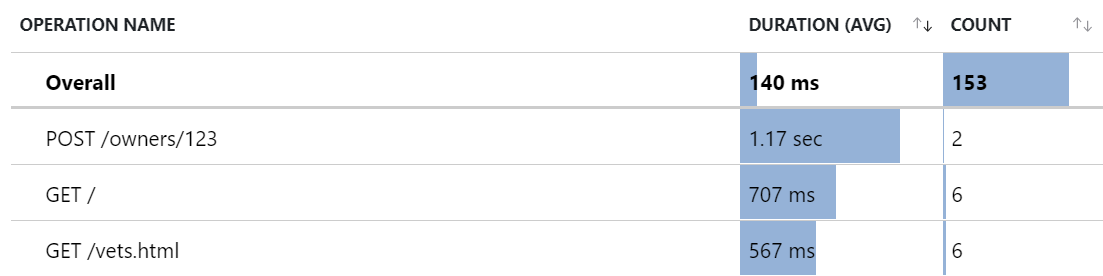
Operation names in Application Insights Java 3.x changed to generally provide a better aggregated view
in the Application Insights Portal U/X, for example:
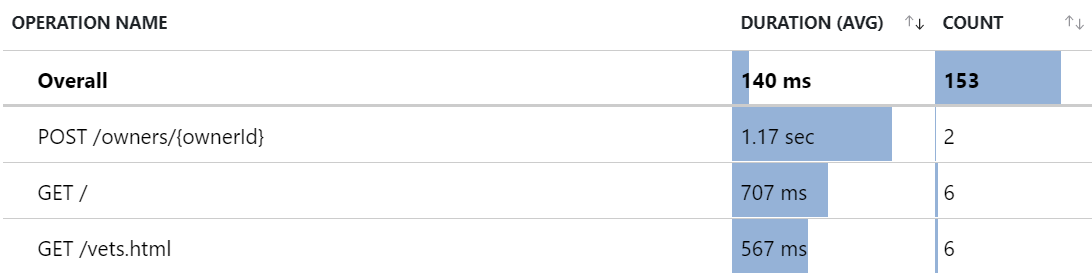
However, for some applications, you might still prefer the aggregated view in the U/X that was provided by the previous operation names. In this case, you can use the telemetry processors (preview) feature in 3.x to replicate the previous behavior.
The following snippet configures three telemetry processors that combine to replicate the previous behavior.
The telemetry processors perform the following actions (in order):
The first telemetry processor is an attribute processor (has type attribute), which means it applies to all telemetry that has attributes (currently requests and dependencies, but soon also traces).
It matches any telemetry that has attributes named http.request.method and url.path.
Then it extracts url.path attribute into a new attribute named tempName.
The second telemetry processor is a span processor (has type span), which means it applies to requests and dependencies.
It matches any span that has an attribute named tempPath.
Then it updates the span name from the attribute tempPath.
The last telemetry processor is an attribute processor, same type as the first telemetry processor.
It matches any telemetry that has an attribute named tempPath.
Then it deletes the attribute named tempPath, and the attribute appears as a custom dimension.
{
  "preview": {
    "processors": [
      {
        "type": "attribute",
        "include": {
          "matchType": "strict",
          "attributes": [
            { "key": "http.request.method" },
            { "key": "url.path" }
          ]
        },
        "actions": [
          {
            "key": "url.path",
            "pattern": "https?://[^/]+(?<tempPath>/[^?]*)",
            "action": "extract"
          }
        ]
      },
      {
        "type": "span",
        "include": {
          "matchType": "strict",
          "attributes": [
            { "key": "tempPath" }
          ]
        },
        "name": {
          "fromAttributes": [ "http.request.method", "tempPath" ],
          "separator": " "
        }
      },
      {
        "type": "attribute",
        "include": {
          "matchType": "strict",
          "attributes": [
            { "key": "tempPath" }
          ]
        },
        "actions": [
          { "key": "tempPath", "action": "delete" }
        ]
      }
    ]
  }
}
Sampling and missing logs
Rate-limited sampling is enabled by default starting in the 3.4 agent, which can cause unexpected missing logs.
Project example
This Java 2.x SDK project is migrated to a new project using the 3.x Java agent.
This guide provides two options to upgrade from the Application Insights Node.js SDK 2.X to OpenTelemetry.
Clean install
Gain prerequisite knowledge of the OpenTelemetry JavaScript Application Programming Interface (API) and Software Development Kit (SDK).
Uninstall the applicationinsights dependency from your project.
npm uninstall applicationinsights
Remove SDK 2.X implementation from your code.
Remove all Application Insights instrumentation from your code. Delete any sections where the Application Insights client is initialized, modified, or called.
Enable Application Insights with the Azure Monitor OpenTelemetry Distro.
Important
Before you import anything else, useAzureMonitor must be called. There might be telemetry loss if other libraries are imported first.
Follow getting started to onboard to the Azure Monitor OpenTelemetry Distro.
Azure Monitor OpenTelemetry Distro changes and limitations
- The APIs from the Application Insights SDK 2.X aren't available in the Azure Monitor OpenTelemetry Distro. While Application Insights SDK 3.X provides a nonbreaking upgrade path for telemetry ingestion (such as custom events and metrics), most SDK 2.X APIs aren't supported and require code changes to OpenTelemetry-based APIs.
- Filtering dependencies, logs, and exceptions by operation name isn't supported yet.
Upgrade
Upgrade the applicationinsights package dependency.
npm update applicationinsights
Rebuild your application.
Test your application.
To avoid using unsupported configuration options in the Application Insights SDK 3.X, see Unsupported Properties.
If the SDK logs warnings about unsupported API usage after a major version bump, and you need the related functionality, continue using the Application Insights SDK 2.X.
Changes and limitations
The following changes and limitations apply to both upgrade paths.
Node.js version support
The Application Insights 3.x SDK supports a Node.js version when both the Azure SDK for JavaScript and OpenTelemetry support that Node.js version. For current OpenTelemetry runtime support, go to OpenTelemetry supported runtimes.
If you use an older Node.js version such as Node 8, OpenTelemetry solutions can run but can produce unexpected behavior or breaking changes. The Application Insights SDK relies on the Azure SDK for JavaScript, and the Azure SDK for JavaScript support policy doesn't guarantee support for Node.js versions that reached end of life. For details, go to Azure SDK for JS support policy.
Configuration options
The Application Insights SDK version 2.X offers configuration options that aren't available in the Azure Monitor OpenTelemetry Distro or in the major version upgrade to Application Insights SDK 3.X. To find these changes, along with the options we still support, see SDK configuration documentation.
Extended metrics
Extended metrics are supported in the Application Insights SDK 2.X; however, support for these metrics ends in both version 3.X of the ApplicationInsights SDK and the Azure Monitor OpenTelemetry Distro.
Telemetry Processors
While the Azure Monitor OpenTelemetry Distro and Application Insights SDK 3.X don't support TelemetryProcessors, they do allow you to pass span and log record processors. For more information on how, see Azure Monitor OpenTelemetry Distro project.
This example shows the equivalent of creating and applying a telemetry processor that attaches a custom property in the Application Insights SDK 2.X.
const applicationInsights = require("applicationinsights");
applicationInsights.setup("YOUR_CONNECTION_STRING");
applicationInsights.defaultClient.addTelemetryProcessor(addCustomProperty);
applicationInsights.start();

function addCustomProperty(envelope: EnvelopeTelemetry) {
    const data = envelope.data.baseData;
    if (data?.properties) {
        data.properties.customProperty = "Custom Property Value";
    }
    return true;
}
This example shows how to modify an Azure Monitor OpenTelemetry Distro implementation to pass a SpanProcessor to the configuration of the distro.
import { Context, Span} from "@opentelemetry/api";
import { ReadableSpan, SpanProcessor } from "@opentelemetry/sdk-trace-base";
const { useAzureMonitor } = require("@azure/monitor-opentelemetry");

class SpanEnrichingProcessor implements SpanProcessor {
    forceFlush(): Promise<void> {
        return Promise.resolve();
    }
    onStart(span: Span, parentContext: Context): void {
        return;
    }
    onEnd(span: ReadableSpan): void {
        span.attributes["custom-attribute"] = "custom-value";
    }
    shutdown(): Promise<void> {
        return Promise.resolve();
    }
}

const options = {
    azureMonitorExporterOptions: {
        connectionString: "YOUR_CONNECTION_STRING"
    },
    spanProcessors: [new SpanEnrichingProcessor()],
};
useAzureMonitor(options);
Follow these steps to migrate Python applications to the Azure Monitor OpenTelemetry Distro.
Step 1: Uninstall OpenCensus libraries
Uninstall all libraries related to OpenCensus, including all Pypi packages that start with opencensus-*.
pip freeze | grep opencensus | xargs pip uninstall -y
Step 2: Remove OpenCensus from your code
Remove all instances of the OpenCensus SDK and the Azure Monitor OpenCensus exporter from your code.
Check for import statements starting with opencensus to find all integrations, exporters, and instances of OpenCensus API/SDK that must be removed.
The following are examples of import statements that must be removed.
from opencensus.ext.azure import metrics_exporter
from opencensus.stats import aggregation as aggregation_module
from opencensus.stats import measure as measure_module

from opencensus.ext.azure.trace_exporter import AzureExporter
from opencensus.trace.samplers import ProbabilitySampler
from opencensus.trace.tracer import Tracer

from opencensus.ext.azure.log_exporter import AzureLogHandler
Step 3: Familiarize yourself with OpenTelemetry Python APIs/SDKs
The following documentation provides prerequisite knowledge of the OpenTelemetry Python APIs/SDKs.
Note
OpenTelemetry Python and OpenCensus Python have different API surfaces, autocollection capabilities, and onboarding instructions.
Step 4: Set up the Azure Monitor OpenTelemetry Distro
Follow the getting started
page to onboard onto the Azure Monitor OpenTelemetry Distro.
Changes and limitations
The following changes and limitations could be encountered when migrating from OpenCensus to OpenTelemetry.
Python versions earlier than 3.7
OpenTelemetry-based monitoring for Python supports Python 3.7 and later. OpenTelemetry doesn't support Python 2.7, 3.4, 3.5, or 3.6.
Python 2.7, 3.4, 3.5, and 3.6 are end of life. For version status, go to Python version support.
If you stay on Python 2.7, 3.4, 3.5, or 3.6, OpenTelemetry solutions can run but can produce unexpected behavior or breaking changes that Microsoft doesn't support.
For OpenCensus, the last released version of opencensus-ext-azure runs on these Python versions. The project doesn't publish new releases.
Configurations
OpenCensus Python provided some configuration options related to the collection and exporting of telemetry. You achieve the same configurations, and more, by using the OpenTelemetry Python APIs and SDK. The OpenTelemetry Azure monitor Python Distro is more of a one-stop-shop for the most common monitoring needs for your Python applications. Since the Distro encapsulates the OpenTelemetry APIs/SDk, some configuration for more uncommon use cases might not currently be supported for the Distro. Instead, you can opt to onboard onto the Azure monitor OpenTelemetry exporter, which, with the OpenTelemetry APIs/SDKs, should be able to fit your monitoring needs. Some of these configurations include:
- Custom propagators
- Custom samplers
- Adding extra span/log processors/metrics readers
Cohesion with Azure Functions
In order to provide distributed tracing capabilities for Python applications that call other Python applications within an Azure function, the package opencensus-extension-azure-functions was provided to allow for a connected distributed graph.
Currently, the OpenTelemetry solutions for Azure Monitor don't support this scenario. As a workaround, you can manually propagate the trace context in your Azure functions application as shown in the following example.
from opentelemetry.context import attach, detach
from opentelemetry.trace.propagation.tracecontext import \
  TraceContextTextMapPropagator

# Context parameter is provided for the body of the function
def main(req, context):
  functions_current_context = {
    "traceparent": context.trace_context.Traceparent,
    "tracestate": context.trace_context.Tracestate
  }
  parent_context = TraceContextTextMapPropagator().extract(
      carrier=functions_current_context
  )
  token = attach(parent_context)

  ...
  # Function logic
  ...
  detach(token)
Extensions and exporters
The OpenCensus SDK provides integrations to collect telemetry and exporters to send telemetry. In OpenTelemetry, integrations are called instrumentations. OpenTelemetry also uses the term exporters.
OpenTelemetry Python instrumentations and exporters cover the OpenCensus set and add more libraries. OpenTelemetry provides a direct upgrade in library coverage and functionality.
The Azure Monitor OpenTelemetry Distro includes several popular OpenTelemetry Python instrumentations. Use these instrumentations without adding code. Microsoft supports these instrumentations.
As for the other OpenTelemetry Python instrumentations that aren't included in this list, users can still manually instrument with them. However, it's important to note that stability and behavior aren't guaranteed or supported in those cases. Therefore, use them at your own discretion.
If you would like to suggest a community instrumentation library us to include in our distro, post or up-vote an idea in our feedback community. For exporters, the Azure Monitor OpenTelemetry distro comes bundled with the Azure Monitor OpenTelemetry exporter. If you would like to use other exporters as well, you can use them with the distro, like in this example.
TelemetryProcessors
There's no concept of TelemetryProcessors in the OpenTelemetry world, but there are APIs and classes that you can use to replicate the same behavior.
Setting Cloud Role Name and Cloud Role Instance
Follow the instructions here for how to set cloud role name and cloud role instance for your telemetry. The OpenTelemetry Azure Monitor Distro automatically fetches the values from the environment variables and fills the respective fields.
Modifying spans with SpanProcessors
Coming soon.
Modifying metrics with Views
Coming soon.
The OpenCensus Python Azure Monitor exporter automatically collected system and performance related metrics called performance counters. These metrics appear in performanceCounters in your Application Insights instance. In OpenTelemetry, we no longer send these metrics explicitly to performanceCounters. Metrics related to incoming/outgoing requests can be found under standard metrics. If you would like OpenTelemetry to autocollect system related metrics, you can use the experimental system metrics instrumentation, contributed by the OpenTelemetry Python community. This package is experimental and not officially supported by Microsoft.
Support
To review troubleshooting steps, support options, or to provide OpenTelemetry feedback, see OpenTelemetry troubleshooting, support, and feedback for Azure Monitor Application Insights.
The following table highlights legacy terms used in Application Insights and their OpenTelemetry replacements.