Microsoft 365 and Office | Access | Other | Other
A family of Microsoft relational database management systems designed for ease of use.

This browser is no longer supported.
Upgrade to Microsoft Edge to take advantage of the latest features, security updates, and technical support.
' cx='32' cy='32' r='32' /%3E%3Ctext x='50%25' y='55%25' dominant-baseline='middle' text-anchor='middle' fill='%23FFF' %3EJ%3C/text%3E%3C/svg%3E)
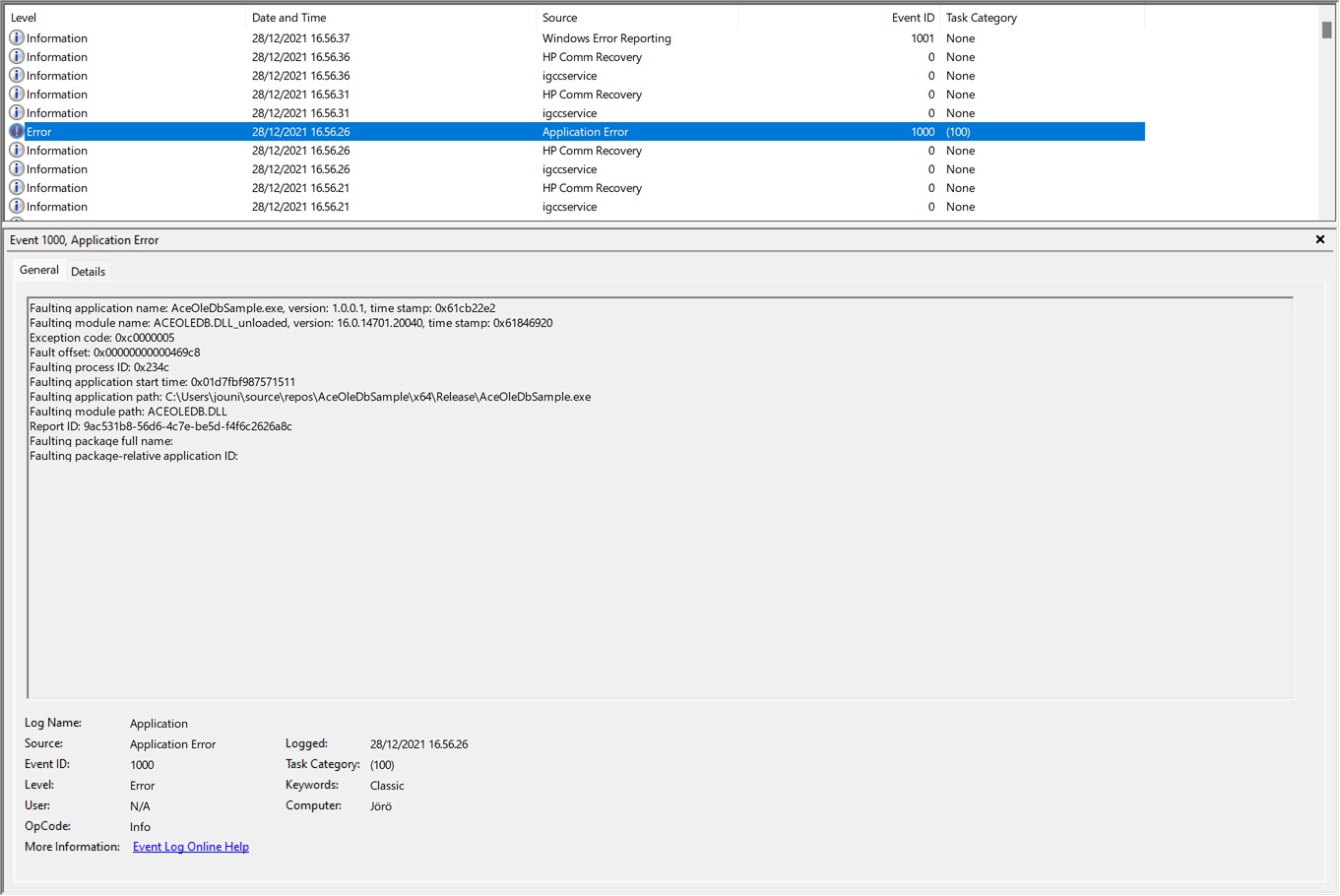
ACEOLEDB.DLL from Microsoft 365 Apps (at least versions 16.0.14228.20248, 16.0.14430.20006, 16.0.14701.20040 in "C:\Program Files\Microsoft Office\root\VFS\ProgramFilesCommonX64\Microsoft Shared\OFFICE16\") appear to cause an application crash which 'Event Viewer' reports as in attached screenshots, Exception code 0xc0000005. This happens about 15 minutes after application is started, even when application right then is idling and not making any database connection.
When using ACEOLEDB.DLL (versions 16.0.5011.1000, 16.0.5044.1000 or 16.0.5164.1000) installed from "Microsoft Access Database Engine 2016 Redistributable" (https://www.microsoft.com/en-us/download/details.aspx?id=54920) to the folder "C:\Program Files\Common Files\microsoft shared\OFFICE16" this trouble doesn't appear.
Practical trouble is that each time Microsoft 365 Apps updates itself, it will activate its own failing version of ACEOLEDB.DLL. This happens rather frequently which make it difficult to handle: https://learn.microsoft.com/en-us/officeupdates/update-history-microsoft365-apps-by-date
The sample application with source code is at: https://1drv.ms/u/s!Ar61IfhIp1W6hNsNAREEGLEGIGGEdQ?e=QaJg6h
The executable "AceOleDbSample.exe" is in the folder "\x64\Release". It opens 'sample.mdb' when its starts and closes it right away. After that about in 12 minutes it crashes.
The only dependency should be "Microsoft Visual 2019 C++ Redistributable" (https://aka.ms/vs/17/release/vc_redist.x64.exe) and naturally either "Microsoft Access Database Engine 2016 Redistributable" (https://www.microsoft.com/en-us/download/details.aspx?id=54920) or Microsoft 365 Apps.
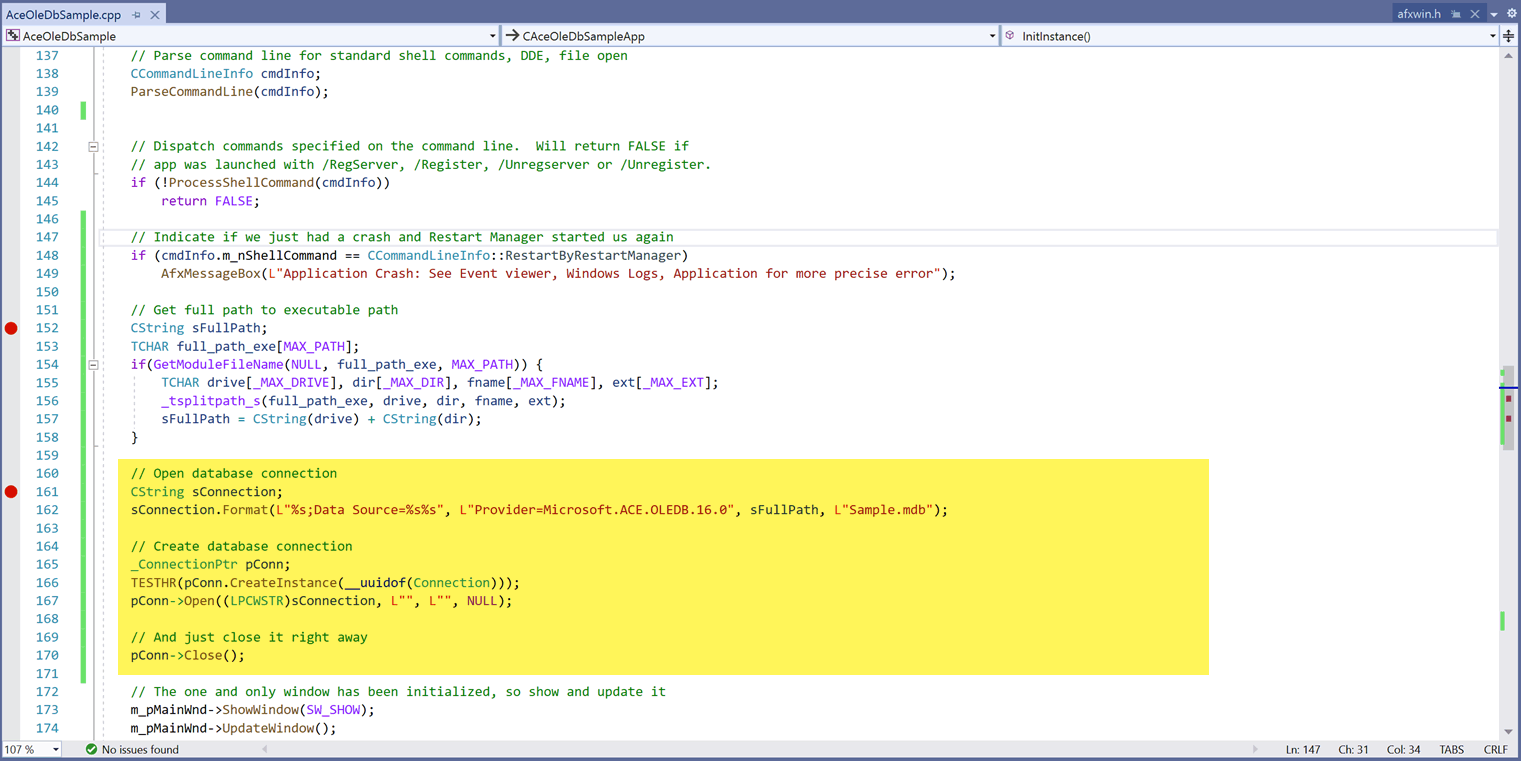
Code snipped causing the failure highlighted in yellow:
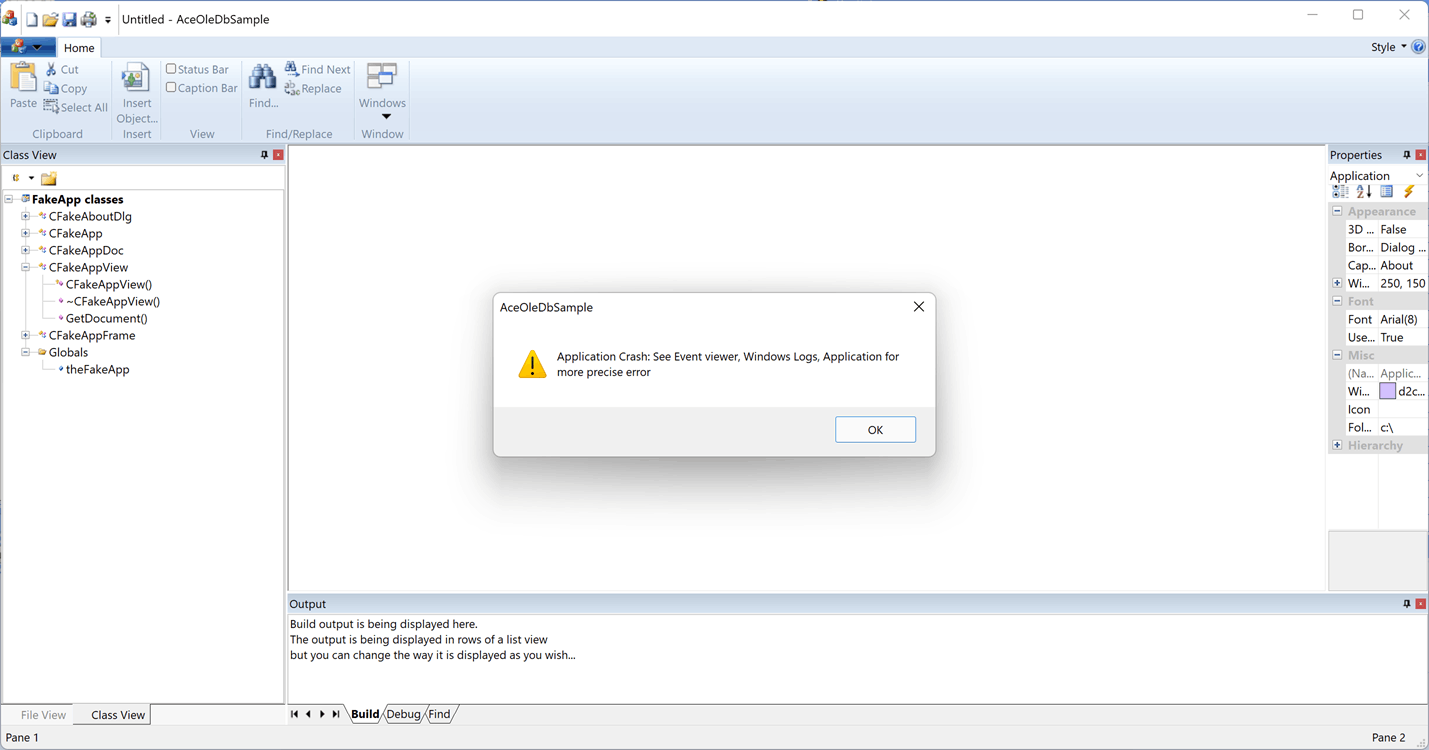
The sample application running, after 'Restart manager' has re-started it after the crash:
A family of Microsoft relational database management systems designed for ease of use.
' cx='32' cy='32' r='32' /%3E%3Ctext x='50%25' y='55%25' dominant-baseline='middle' text-anchor='middle' fill='%23FFF' %3EBG%3C/text%3E%3C/svg%3E)
No, unfortunately not: Microsoft is no longer going to correct these old drivers. I manually do a check on the contents of those registry keys and when they were changed by Windows, I put them back the way it works:
Windows Registry Editor Version 5.00
[HKEY_LOCAL_MACHINE\SOFTWARE\Classes\CLSID{3BE786A0-0366-4F5C-9434-25CF162E475E}\InprocServer32]
@="C:\Program Files\Common Files\Microsoft Shared\OFFICE16\ACEOLEDB.DLL"
"ThreadingModel"="Both"
Hope this is of some use to you....
' cx='32' cy='32' r='32' /%3E%3Ctext x='50%25' y='55%25' dominant-baseline='middle' text-anchor='middle' fill='%23FFF' %3EZR%3C/text%3E%3C/svg%3E)
thanks for the feedback, i will give it a try ;)
I noticed that Microsoft has updated ACEOLEDB.DLL on my computer to version 16.0.18526.20118 (dated 24.02.2025). It seems someone is making updates to Access 2016, although getting support from Microsoft for this has been quite challenging.
The good news is that my test application (link above to 'AceOleDbSample') has been running since yesterday without crashing. Perhaps my issue has been resolved. It's difficult to determine which of the changes listed here contributed to this: https://learn.microsoft.com/en-us/officeupdates/current-channel-preview
' cx='32' cy='32' r='32' /%3E%3Ctext x='50%25' y='55%25' dominant-baseline='middle' text-anchor='middle' fill='%23FFF' %3EDL%3C/text%3E%3C/svg%3E)
Your solution is consistent. I disabled Office Updates before application install, installed the application, and then exported the parent registry entries of the keys that reference ACEOLEDB
Periodically I enable and install Office Updatse then disable further updates.
After an update I import the previously exported registry entries.
Alternatively enable updates and import the entries before invoking the application
Hi Bart,
Yes, I think this trouble is still there in Access 2016 Database engine of Microsoft 365 (Office), also in today's 16.0.17231.20036 version. Microsoft 365 keeps on updating itself regularly and overwrites the failing version on customer PC's. Just two weeks ago had the last case.
Workaround we have been using for 2 years is to open one database connection when program starts, and keep it alive. Close it only until the program ends. Code snippet here below:
The way I have tried to fix it, which currently works is every time I start the application I check those registry keys and change them by a task I start. I also do this check at startup of each data screen. Thanks in advance for the tip. I am definitely going to check this and test this out, but they would definitely need to modify the source or resolve the conflict between Office 365 and AccessDBengine!
' cx='32' cy='32' r='32' /%3E%3Ctext x='50%25' y='55%25' dominant-baseline='middle' text-anchor='middle' fill='%23FFF' %3ESJ%3C/text%3E%3C/svg%3E)
Support for the Access Database Engine 2016 Redistributable ended on October 14, 2025. The recommended replacement is the Microsoft 365 Access Runtime. On my machine, the runtime's ACEOLEDB.DLL was signed on Dec 15, 2025. You might want to try out that version.
A static global connection fix might mean the connection pool does something unexpected when shutting down. You can try disable OLE DB Resource Pooling with OLE DB Services = 0; (at a cost of speed and resource usage) in your connection strings to see if it makes a difference.
has the problem solved with you? we also have an ACEOLEDB.DLL crash with Exception code 0xc0000005 with an APP with OfficePro2021LTSR current version. Microsoft is unable to analyze the problem, even though the problem has been recurring for years, either MS is incapable or ignorant?! and unfortunately you can forget about the support for some years, you have the feeling that the problems are trying to solve by "Google" or predetermined standard answers and have no idea what we are talking about. It has nothing to do with Access installation either, we have Office WITHOUT Access installed, the faulty DLL is located in an office shared folder and is always installed with it.
I see that this is already an older ticket, but I am also bumping into a completely similar problem over the last few months, both on my development device and on all client devices.
I have created a vb application based on an access database. This of course requires the accessdbengine. What I was able to figure out in the last months is the following: when the accessdbengine is not yet installed, i.e. only office365, the below registry entries have the value “C:\Program Files\Microsoft Office\root\VFS\ProgramFilesCommonX64\Microsoft Shared\OFFICE16\ACEOLEDB.DLL” with version 16.0.17231.20036 but then the application crashes on the connectionstring or sql strings.
- [HKEY_LOCAL_MACHINE\SOFTWARE\Classes\CLSID{3BE786A0-0366-4F5C-9434-25CF162E475E}\InprocServer32]
- [HKEY_LOCAL_MACHINE\SOFTWARE\Classes\CLSID{3BE786A0-0366-4F5C-9434-25CF162E475F}\InprocServer32]
- [HKEY_LOCAL_MACHINE\SOFTWARE\Classes\CLSID{3BE786A2-0366-4F5C-9434-25CF162E475E}\InprocServer32]
- [HKEY_LOCAL_MACHINE\SOFTWARE\Classes\CLSID{3BE786A2-0366-4F5C-9434-25CF162E475F}\InprocServer32]
After installing AccessDBengine, the above registry entries change to "C:\Program Files\Common Files\Microsoft Shared\OFFICE16\ACEOLEDB.DLL" with as version16.0.5320.1000 and with these registry entries the application does work.
But always after several days this registry entry keeps getting reset.
Can this be disabled? Did I do something wrong when designing the application? Is this some kind of bug